Solve any coding problem
from a screenshot
LeetCodeSaurus lives in your menu bar. Press a hotkey, capture the problem, get a full solution — without switching windows.
Everything you need
The answer, in seconds
See the problem. Press one key. A full solution — approach, complexity, clean code — appears before your interviewer finishes reading the question aloud.
4 AIs. One hotkey.
Claude, GPT-4o, Gemini, DeepSeek. Each thinks differently. Pick the best take for every problem. Free users get one. Guess which group gets more offers.
Ask out loud. Get the answer.
Stuck on time complexity? Press a hotkey, ask out loud, get a streamed explanation in seconds. No typing, no Googling, no losing your train of thought.
Completely invisible to interviewers
The solution window is excluded from screen recording at the OS level. Zoom, Teams, Meet — none of them can capture it. Your interviewer sees exactly what you want.
Works anywhere. No mouse needed.
Any app. Any platform. Any problem. Global hotkeys mean you never switch windows or reach for the mouse. One keypress from anywhere on your Mac.
Teach the AI how you think
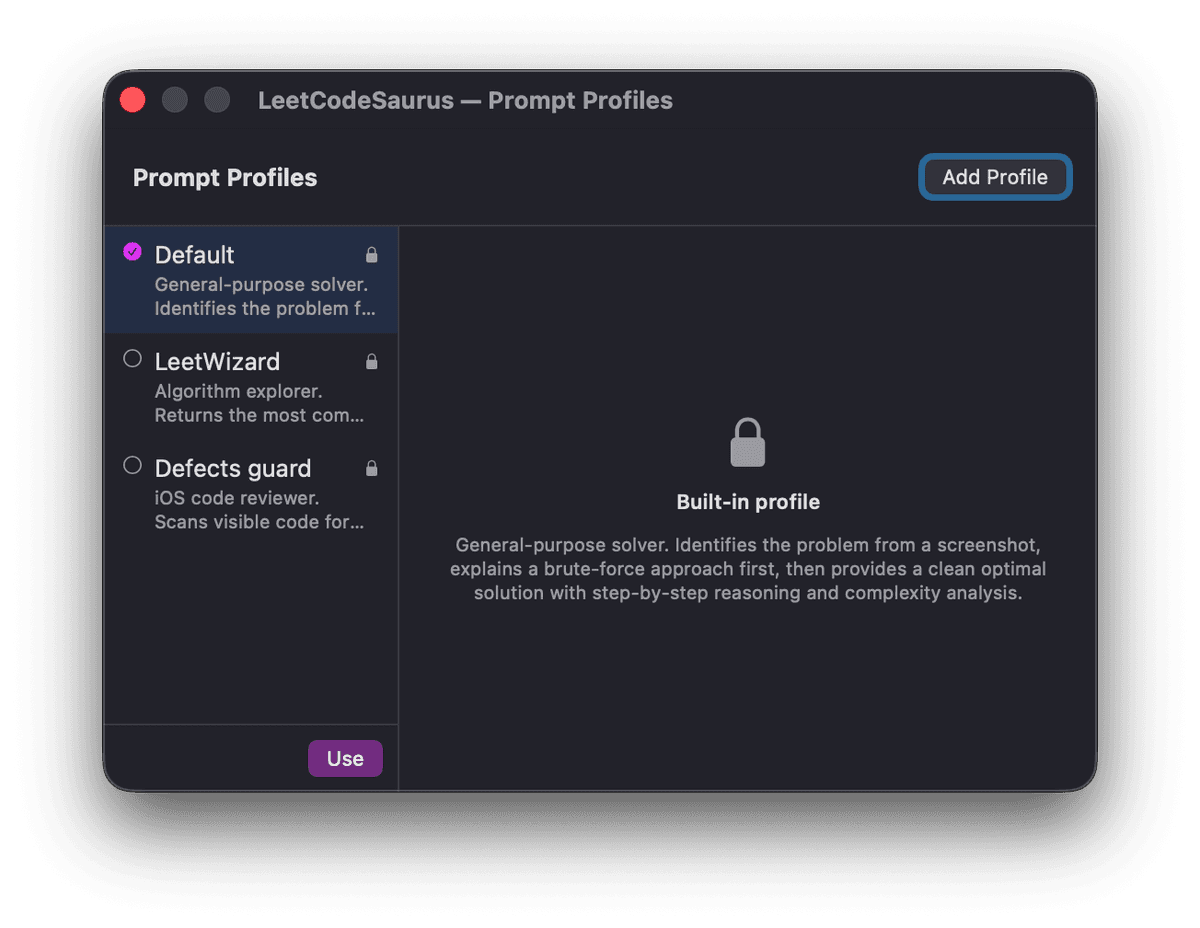
Set it to explain step-by-step, jump straight to optimal, or anything in between. Premium users build custom profiles. The AI adapts to you, not the other way around.
Solution on your phone. Nothing on screen.
Open a URL on your phone or tablet and the solution streams there in real time. Your Mac screen stays completely clean — no overlay, no window, nothing to hide. The ultimate protection.
How does it work?
Three steps. No browser extension. No copy-paste. Just a hotkey.
It knows what problem you're on — before you ask
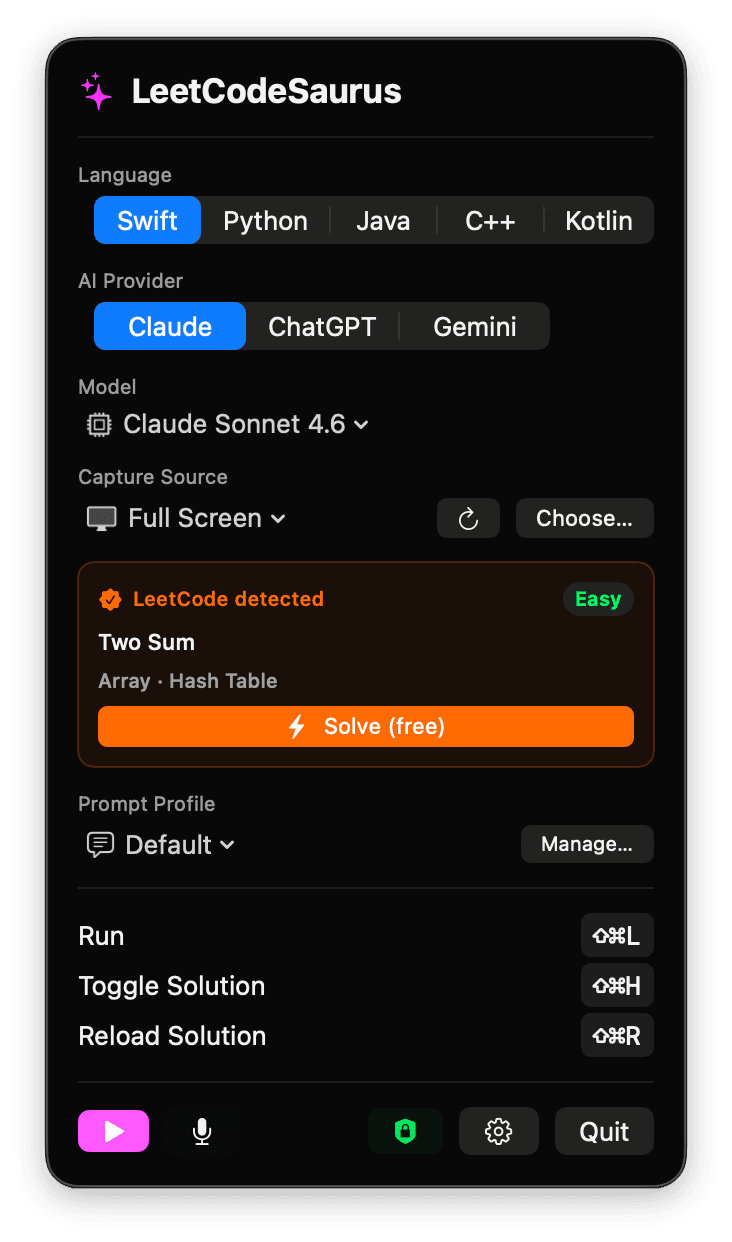
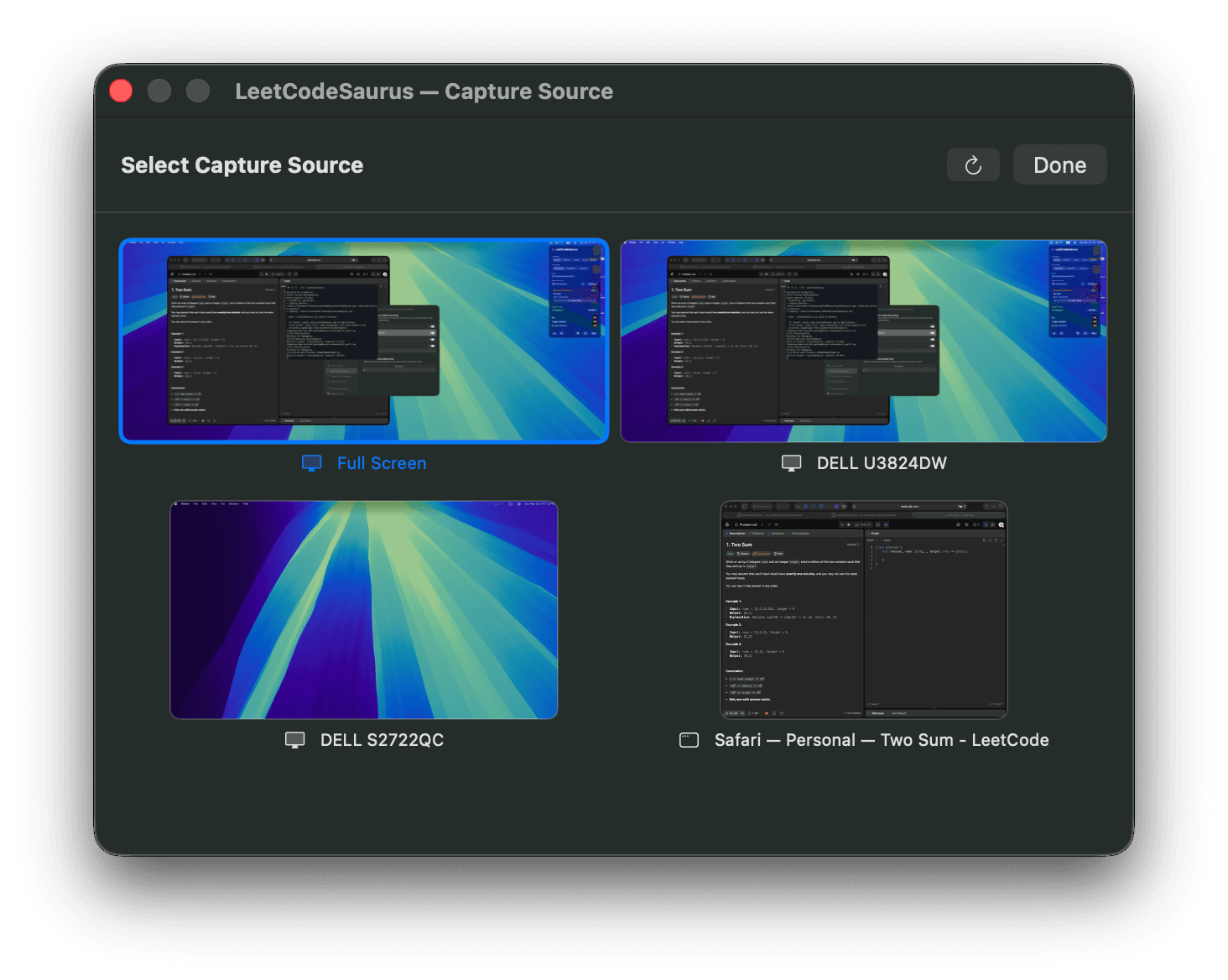
Open the menu bar popup, pick your language and AI provider, and point it at the right screen. LeetCodeSaurus automatically detects the LeetCode problem you're viewing — name, difficulty, and tags — and shows a one-tap Solve button. No copy-paste, no switching apps.
- 🎯Auto-detects LeetCode problems — difficulty, name, and topic tags shown instantly
- 🖥️Choose any capture source: full screen, a specific monitor, or a single browser window
- 🤖Switch between Claude, ChatGPT, and Gemini — pick the AI for each problem
Press ⌘⇧L — get a full solution in seconds
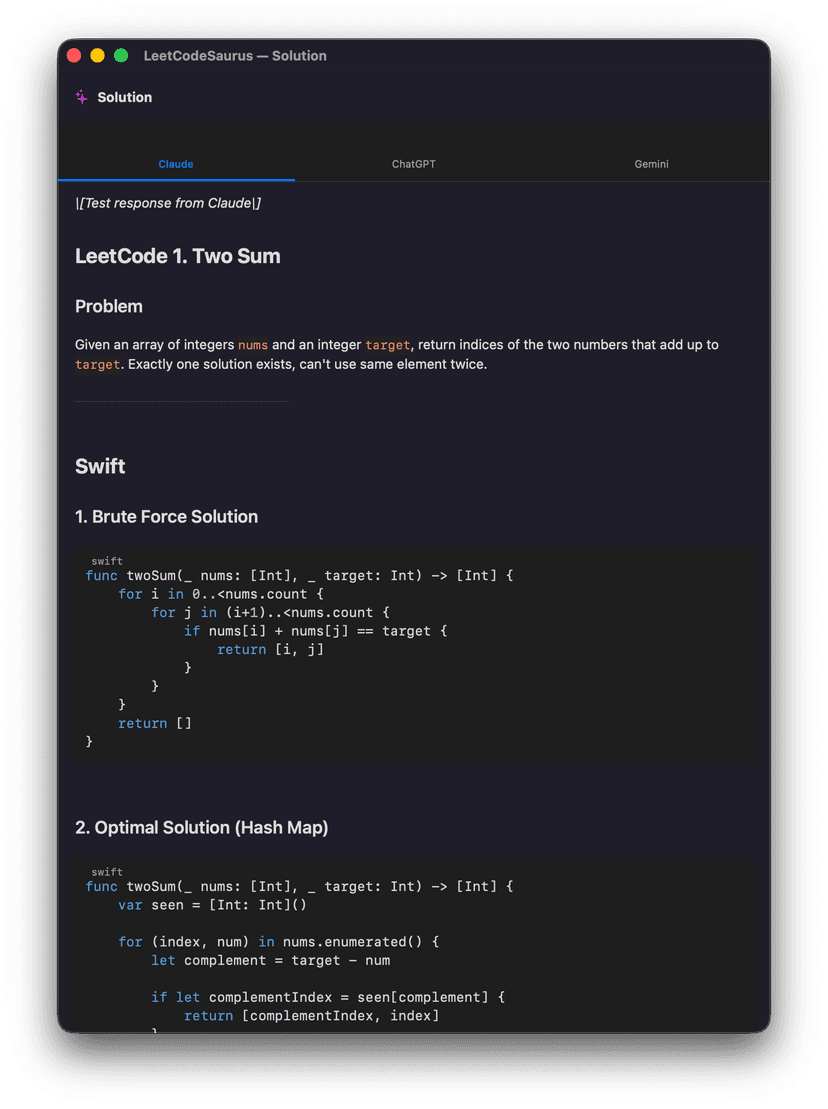
Press the capture hotkey from anywhere on your Mac. LeetCodeSaurus takes a screenshot, sends it to the AI provider of your choice, and streams back a complete, formatted solution — including problem summary, multiple approaches, time and space complexity, and clean code. Switch between Claude, GPT-4o, and Gemini tabs to compare.
- ⚡Solution appears in a dedicated floating window, never in your browser
- 🔄Compare Claude, GPT-4o, and Gemini side by side with one click
- 🎤Ask follow-up questions by voice — press ⌘⇧V and speak naturally
Fine-tune every detail — model, profile, hotkeys
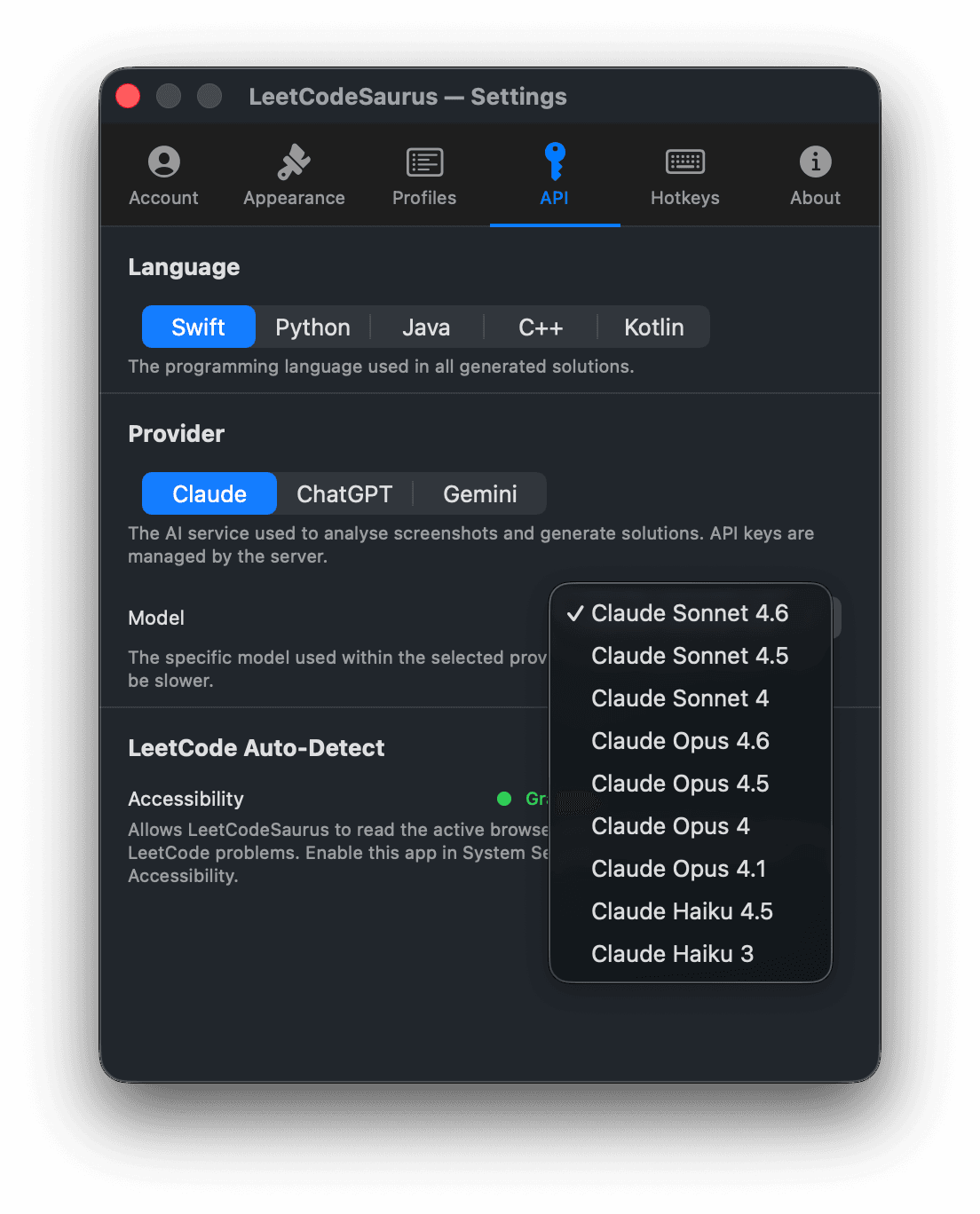
Settings give you full control. Pick the exact model within each provider (Claude Sonnet 4.6, Opus 4.6, Haiku…), choose a prompt profile that matches your style, and remap every hotkey. LeetCode Auto-Detect reads your active browser tab so the right problem is always loaded automatically.
- 🤖Choose specific models — Sonnet, Opus, Haiku across Claude, ChatGPT, Gemini
- 📝Prompt profiles: Default, LeetWizard, Defects Guard, or build your own
- 🔑Every hotkey is remappable — capture, toggle, reload, voice
🛡️Why it's safe to use
The solution window is flagged as a non-capturable layer at the macOS window level. Screen sharing software, OBS, Zoom, Teams — none of them can capture it. This is enforced by the OS, not a trick.
Open a URL on your phone or tablet and the solution appears there in real time. Your Mac screen stays completely clean. No overlay, no window, nothing to explain away. This is the feature that changes everything.
LeetCodeSaurus works by capturing your screen natively — it never injects code into your browser, doesn't touch the DOM, and leaves no trace in browser history or network logs.
Screenshots are sent directly to the AI provider (Anthropic, OpenAI, or Google) and are not stored by LeetCodeSaurus. Your session tokens live only on your device in the macOS keychain.
There is no middleman process, no browser tab, no remote desktop component. The app runs as a signed, sandboxed process under your own user account.
🖥️ Benefits of a native macOS app
Because LeetCodeSaurus is a native app, its hotkeys work from any application — your IDE, a PDF viewer, a coding platform in any browser — without needing focus.
Native apps launch in milliseconds and stay resident in your menu bar. There's no web page to load, no React tree to hydrate, no CDN round-trip before you can act.
LeetCodeSaurus uses ScreenCaptureKit — Apple's first-party, high-performance capture framework — to take pixel-perfect screenshots of any window or display.
Voice follow-ups use Apple's on-device Speech framework. Your audio is transcribed locally — it never leaves your Mac before being sent to the AI.
A menu bar app with no background polling consumes effectively zero resources when you're not using it. Unlike a browser extension, it doesn't run on every page load.
Simple pricing
Start free, upgrade when you need more.
- ✓AI on LeetCode.com only
- ✓Claude (Anthropic)
- ✓Basic prompt profiles
- ✓Screen share protection
- ✓Community support
- ✓All 4 AI providers (Claude, GPT-4o, Gemini, DeepSeek)
- ✓Live View — solution on your phone, screen stays clean
- ✓Voice follow-ups
- ✓All prompt profiles + custom
- ✓Priority support
$23.33 / mo
- ✓All 4 AI providers (Claude, GPT-4o, Gemini, DeepSeek)
- ✓Live View — solution on your phone, screen stays clean
- ✓Voice follow-ups
- ✓All prompt profiles + custom
- ✓Priority support
Not sure yet? See full plan comparison →
Questions & Answers
Everything you need to know before getting started.